● Free · No sign-up · Version 1.0.0

Better AI answers
in one click

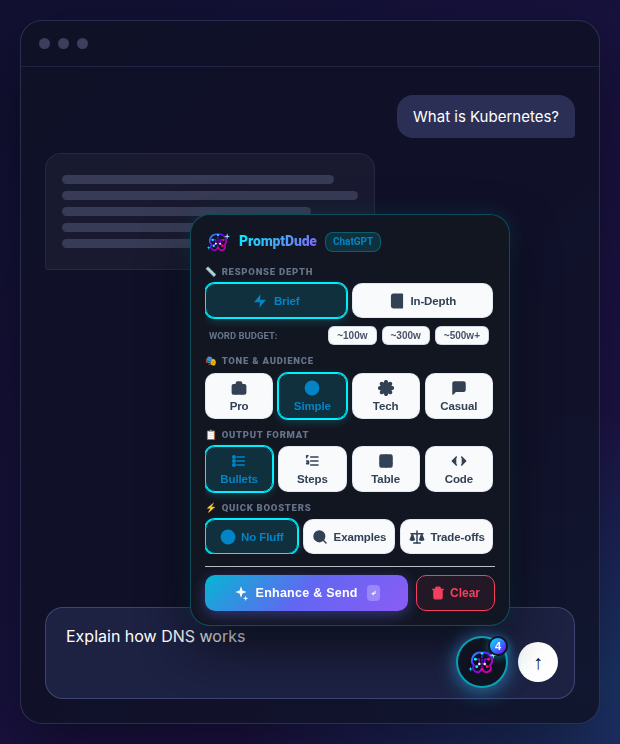
Type your question, tap how you want the answer (short, simple, bullets, table, code…), then hit Enhance & Send. PromptDude rewrites your prompt and sends it for you.
Works in Chrome, Edge, Brave, Opera, Vivaldi and Firefox on desktop.

The PromptDude panel open above a chat box, with Brief, Simple, Bullets and No Fluff selected and an Enhance & Send button

How it works

No prompt engineering needed. Three taps and the AI answers the way you want.

1

Type your question

Write it as usual in ChatGPT, Claude, Gemini or any supported chat. Or leave the box empty to fix the last answer.

2

Pick the style

Click the PromptDude button next to the chat box and choose depth, tone, format and boosters like No Fluff or Examples.

3

Enhance & Send

One click adds clear instructions to your prompt and sends it. Fed up with an answer? Empty box + Enhance & Send redoes it your way.

Install in one minute

PromptDude isn't in the browser stores yet, so you install it directly. It's safe: the full source code is public.

Your browser

Chrome, Edge, Brave, Opera, Vivaldi

Any Chromium-based browser

  1. Download promptdude-chromium.zip and unzip it (double-click on Mac, right-click → Extract All on Windows).
  2. Open a new tab and go to chrome://extensions
  3. Turn on Developer mode (toggle at the top right).
  4. Click Load unpacked and choose the unzipped promptdude-chromium folder.
  5. Open ChatGPT, Claude or Gemini. The PromptDude button appears next to the chat box. 🎉
⬇ Download promptdude-chromium.zip

Keep the unzipped folder: deleting it removes the extension. To update, download the new zip, replace the folder, then click ↻ on the PromptDude card in the extensions page.

Your browser

Firefox

Desktop and Android

The Firefox version is being signed by Mozilla and will be available here soon. Check back shortly!

Works on

ChatGPTClaudeGeminiDeepSeek PerplexityGrokMicrosoft CopilotMistral Le Chat PoeHuggingChatMeta AIQwen Chat

Privacy policy

Last updated: October 12, 2026. PromptDude is built to collect nothing.

What PromptDude does with your data

  • Prompt text: when you click Enhance & Send, PromptDude reads the text in the chat box of the AI website you are on, adds the instructions you selected, and clicks that website's send button. This happens entirely inside your browser. Your prompt only goes to the AI website you are already using, exactly as if you had typed it yourself.
  • Settings: the button position and your last-selected options are saved in your browser's local extension storage and never leave your device.

What PromptDude does not do

  • No data collection, analytics, telemetry or tracking
  • No accounts, no servers, no network requests
  • No selling or sharing of data
  • No access to any website other than the supported AI chat sites

Permissions

  • storage: remembers your button position and selected options on your device.
  • Supported AI chat websites: needed to show the PromptDude button and to read and update the prompt box on those sites only.

Removing your data

Uninstalling PromptDude deletes all of its stored settings.

Contact

Questions? Open an issue on GitHub.